
Meta Description:
Looking for a LuxAlgo review? We analyze LuxAlgo Premium features, pricing, free alternatives, and whether this TradingView tool fits your trading style.


If you have spent any time on TradingView, you have probably seen the name LuxAlgo everywhere. From complex order blocks to AI-generated strategies, it has become one of the most talked-about names in technical analysis.
But with so many “LuxAlgo Premium Free” searches happening online, it is clear that traders are curious but hesitant about the price tag. Is it really worth the money? Can you get LuxAlgo for free legally? And how does it actually perform on platforms like ThinkOrSwim or MT4?
I have tested the suite extensively to cut through the noise. Whether you are looking for a Lux Algo buy sell indicator or a full trading bot, this guide covers everything you need to know about LuxAlgo in 2026.
What is LuxAlgo? (An Overview)
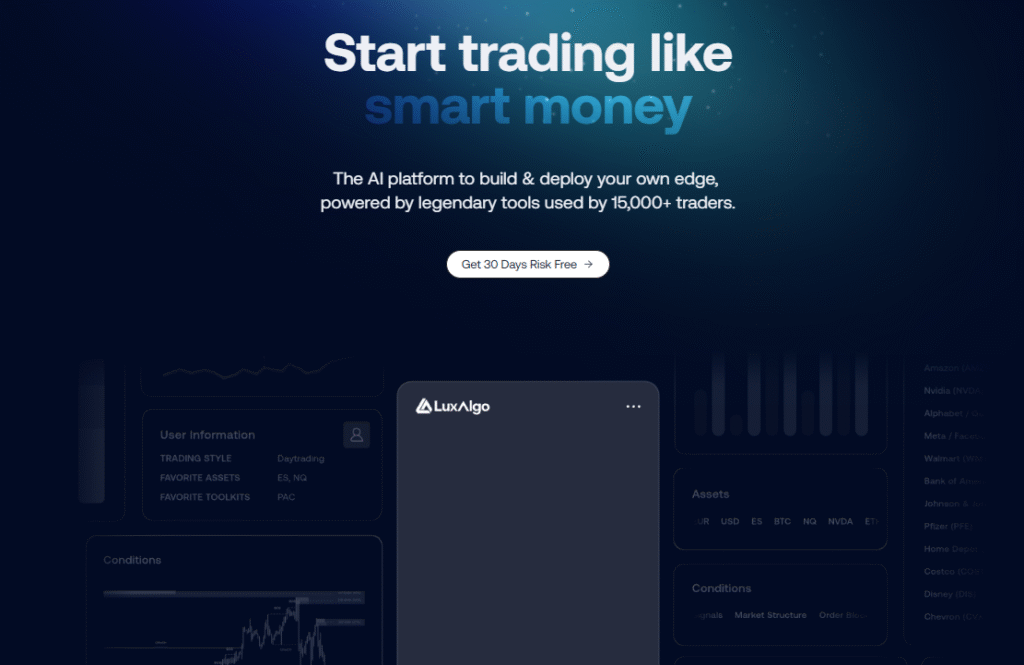
LuxAlgo is a premium suite of trading indicators and tools built primarily for TradingView . Founded in 2020, it has grown into a massive ecosystem with over 50,000 users and a Discord community of more than 150,000 members .
Unlike a single indicator, LuxAlgo is a collection of toolkits designed to work together. Think of it as a “Operating System” for your charts. Instead of drawing trendlines and support zones manually, LuxAlgo automates the process using algorithms and AI.
Who is it for?
It is designed for retail traders who want institutional-style analysis (like Smart Money Concepts) without spending hours drawing lines on their charts.
The Main Toolkits: What Does LuxAlgo Premium Include?
If you visit the LuxAlgo com website, you will see they structure their premium offering into three main pillars. Understanding these is key to knowing what you pay for.
1. Price Action Concepts (PAC)
This is the “Smart Money” toolkit. It automatically detects:
- Order Blocks (OB): Where institutions placed large orders.
- Fair Value Gaps (FVG): Imbalances in price.
- Liquidity Levels: Where stop-hunts are likely to occur .
2. Signals & Overlays (S&O)
This is the highest-rated paid indicator on TradingView . It provides actual “Buy” and “Sell” signals directly on your chart. It helps filter out market noise and suggests entries based on trend strength.
3. Oscillator Matrix
A dashboard of momentum oscillators. Instead of looking at RSI, Stochastics, and MACD separately, they are combined into one moving bubble chart to spot divergences instantly.
4. AI & Quant Tools (Ultimate Plan)
This is the new frontier for Lux Algo trading. The AI Backtester allows you to input an idea (e.g., “Buy when volume spikes and RSI is low”), and the AI will write the code, backtest it, and optimize it for you .
LuxAlgo on Different Platforms
A common question is whether LuxAlgo works only on TradingView. The answer is no, but with caveats.
Key Takeaway: If you want the full “Lux Algo Premium” experience (AI backtesting, S&O signals), you must use TradingView. The other platforms only have legacy or free indicators.
Pricing: How Much Does LuxAlgo Cost?
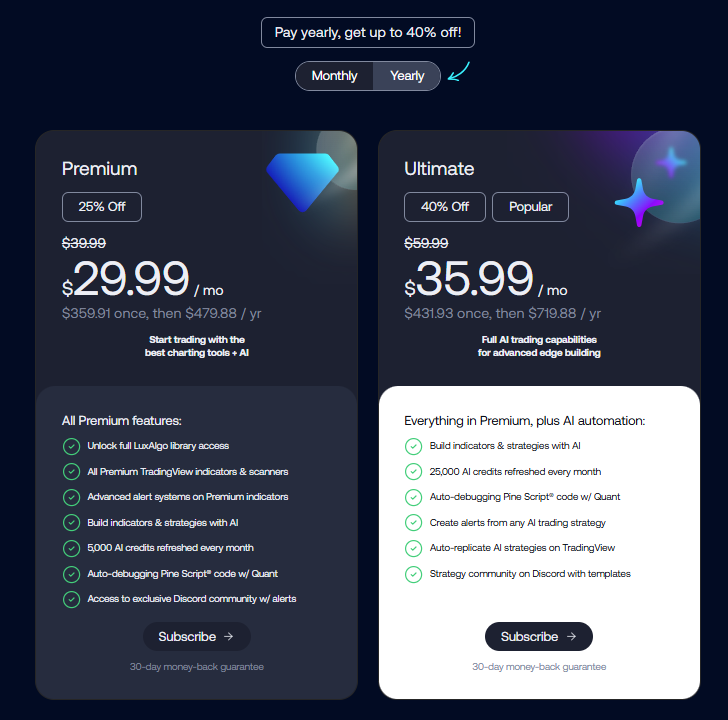
Let’s talk money. Many people search for Lux Algo Premium Free or Lux Algo Free, but the reality is that the premium features require a subscription.
Here is the breakdown based on current plans :
- Free Tier (The Library): Yes, Luxalgo free exists. They have published hundreds of free scripts on TradingView (like Smart Money Concepts and Supply/Demand zones). This is a great way to test their coding quality.
- Premium Plan: Approximately $39.99/month (billed annually) or higher month-to-month.
- Ultimate Plan: Approximately $49.99+/month. This adds the AI Backtesting Assistant and priority support.
Is there a “Lux Algo Premium Free” trick?
No, but there is a 30-day money-back guarantee. This is the only legitimate way to get “free” access to the premium tools. You can sign up, test it for a month, and request a refund if it doesn’t suit your style.
Free Alternatives vs. LuxAlgo Premium
You do not need to spend money to be a profitable trader. The TradingView community is vast. How do LuxAlgo indicators compare to free ones?
The Case for Free Indicators
You can build a solid strategy using free tools. For example:
- Liquidity & SMC: LuxAlgo’s own free Smart Money Concepts script covers order blocks and liquidity sweeps well enough for most traders .
- Machine Learning: The Lorentzian Classification by Jdehorty is a free, open-source ML indicator that many compare favorably to LuxAlgo .
The LuxAlgo Advantage
So, why pay?
- Convenience: Free scripts often look messy. LuxAlgo Premium has a unified “cinematic” aesthetic and a beginner mode that hides complexity .
- Integration: The Premium indicators talk to each other. The Signal indicator respects the Order Blocks found by the PAC indicator.
- The Screeners: With free indicators, you have to scan charts one by one. LuxAlgo Premium includes a multi-ticker screener that runs through hundreds of stocks to find setups matching your criteria .
How to Use LuxAlgo: A Step-by-Step Workflow
If you decide to try Lux Algo TradingView integration, here is how a professional trader might set it up:
Step 1: Installation
- Go to LuxAlgo com and sign up for the Premium trial.
- Connect your TradingView account.
- Add the “Signals & Overlays” and “Price Action Concepts” indicators to your chart.
Step 2: The “Beginner Mode” Setup
When you first load it, the chart looks like a rainbow exploded on it. Turn on Beginner Mode in the settings. This hides the complex “Efficient Frontier” lines and just shows the core liquidity zones and signals .
Step 3: Setting Signal Strength
LuxAlgo allows you to filter signals by strength (1 to 5).
- Levels 1-3: Mostly noise. Avoid.
- Level 4-5: High probability setups. Only trade these.
Step 4: The Entry Strategy (Long)
- Wait for price to sweep a liquidity level (a previous low).
- Look for a Fair Value Gap (FVG) to appear.
- Wait for the Signal indicator to flash a Green Buy Signal.
- Enter the trade.
LuxAlgo vs. The Competition
Many people ask how Lux Algo compares to other automated tools.
LuxAlgo vs. TradingView Premium (Built-in)
TradingView’s built-in indicators (RSI, MACD, Supertrend) are lagging. LuxAlgo is predictive and based on volume/order flow. You cannot replicate LuxAlgo using standard TradingView tools.
LuxAlgo vs. Other Paid Scripts
There are many “Black Box” indicators on the market that repaint signals (change history to look accurate). LuxAlgo has a reputation for being transparent about repainting (most of their signals do not repaint, or they clearly warn you when they do).
User Sentiment (LuxAlgo Reddit & Trustpilot):
- Trustpilot: Generally positive (~4.6/5). Users praise the support team .
- Reddit: Mixed. “Too expensive” vs. “The screener saved my job.” The consensus is that if you are a casual trader, skip it. If you are a day trader, buy it .
Frequently Asked Questions (FAQs)
1. Is there a free version of LuxAlgo?
Yes. Luxalgo free is available via the “LuxAlgo Library” on TradingView. You get access to tools like Smart Money Concepts and Volume Profile without paying, but you do not get the AI or Signals & Overlays toolkits .
2. Can I use LuxAlgo on ThinkOrSwim?
Yes, but only specific scripts. The Lux Algo Thinkorswim library includes tools like the Omni Flow Consensus, but it lacks the advanced AI backtesting found on TradingView .
3. Does the LuxAlgo buy sell indicator repaint?
Most of the core signals do not repaint (the signal appears on the current candle close and stays there). However, some features like the AI Backtester require caution as they use future data for calculation .
4. What is the cost of the LuxAlgo subscription?
The Luxalgo price for the Premium plan starts at roughly $40/month when billed annually. The monthly rolling plan is more expensive (approx $60-$70) .
5. Is LuxAlgo available for MT4?
Yes, the Lux Algo MT4 and MT5 libraries exist. However, these are mostly the free community indicators, not the Premium suite. To get the full “Smart Money” experience, you need TradingView .
6. Does LuxAlgo have a Trading Bot?
Indirectly, yes. Lux Algo trading bot functionality comes via Webhooks. You can set an alert on a LuxAlgo signal to send a webhook to a third-party platform (like 3Commas or TradersPost) which then executes the trade automatically on your broker .
7. Is LuxAlgo worth it for scalping?
Yes, the Lux Algo scalping tools are quite good, specifically the “Omni Flow” indicators which react quickly to 1-minute and 5-minute chart movements .
Conclusion: Should You Buy LuxAlgo?
After reviewing the features, pricing, and alternatives, the answer depends entirely on your trading volume.
You should buy LuxAlgo Premium if:
- You trade daily and value your time over money.
- You struggle with drawing order blocks and zones manually.
- You want an “All-in-One” dashboard without juggling 10 different free indicators.
- You trade full-time or for a prop firm.
You should stick to LuxAlgo Free if:
- You are a beginner (learn the basics first).
- You only trade a few times a month.
- You enjoy coding your own indicators in Pine Script.
The Verdict: LuxAlgo is not magic. It will not turn a losing trader into a millionaire overnight. However, it is arguably the best “productivity tool” for a TradingView user. The Lux Algo Premium suite removes the guesswork from technical analysis, allowing you to focus on risk management and execution. If the cost doesn’t break the bank, take advantage of the 30-day trial and see for yourself.


